
TL;DR
- Vega's AI onboarding pipeline takes a connector from raw ingestion to detection-ready in under an hour, replacing what used to be weeks of manual parser-writing and field-mapping.
- Every stage runs automatically: data-instance discovery, source mapping, parser generation, OCSF fields mapping & normalization and indexing. Where AI can't confidently complete a step, the connector panel flags it for the engineer.
- Parsers and normalization files are reusable across connectors, so consistently structured fields mean detection rules work reliably across every data source.
Why is data onboarding still a multi-week problem in 2026?
Every security team knows the feeling. You've just connected a new data source (a cloud storage bucket, a SIEM, an endpoint telemetry feed) and the clock starts ticking. Somebody needs to figure out what's in those logs, write a parser, normalize the fields, and map everything to your detection schema before any of it becomes useful.
For most teams, that work takes days. Sometimes weeks. It's meticulous, error-prone, and deeply dependent on engineers who understand both the data source and the platform's internal schema. One wrong field mapping and a detection rule silently stops firing.
The problem isn't that security teams lack the skills. It's that the pipeline between "data connected" and "data usable" has always been treated as a manual process, one that scales linearly with the number of connectors, data types, and analysts on the team. At the speed modern threats move, that's not good enough.
Vega was built to change this. We designed an AI-driven onboarding pipeline that takes data from raw ingestion to fully normalized, indexed, and detection-ready, automatically, and with full transparency at every stage.
What does AI-driven onboarding look like in practice?
Context: A security engineering team at a mid-size enterprise is onboarding a Splunk connector to Vega. The connector carries dozens of data instances: authentication logs, endpoint events, network flows, and more. In the past, onboarding a connector like this meant weeks of manual parser writing and field mapping. With Vega, the pipeline starts the moment the connector is configured.
The user action: The engineer connects the Splunk instance to Vega and opens the connector panel. Within seconds, Vega has identified all data instances flowing through the connection and Vega AI has begun working: mapping each instance to its data source and applying fields mapping. The engineer can see the status of every instance in real time, including which are completed, which are still processing, and which ones the AI flagged for review.
For any instances the AI couldn't confidently map, the engineer steps in directly from the connector panel, defining the data source and resolving the gap in minutes. One instance needs a custom parser. Rather than writing it from scratch, the engineer uploads a sample log file and lets Vega AI generate the parser script, reviewing and validating it against real log samples before saving.
The outcome: In under an hour, a connector that previously would have taken weeks to onboard is fully operational. Every data instance is mapped, parsed, indexed and normalized. The detection engineering team can start writing rules immediately, with confidence that the fields they're referencing are consistently structured across every data source.
How does Vega's onboarding pipeline work end-to-end?
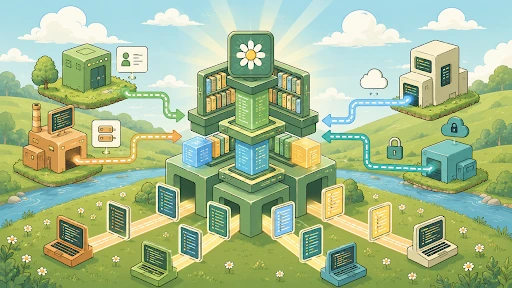
The Vega onboarding pipeline runs automatically from the moment a connector is established. Here's the full data flow:

Stage 1: Data instance discovery
When a connector is established, Vega automatically identifies every data instance flowing through it: the individual streams, buckets, or tables within the connection. Each instance is tracked independently through the pipeline, giving teams granular visibility into exactly what's onboarded and what still needs attention.
Stage 2: AI-driven data source mapping
Vega AI analyzes each data instance and automatically assigns it to the appropriate data source (authentication logs, endpoint telemetry, network events, and so on). Where AI can confidently map an instance, it does so with no user input required. Where it can't, the instance is flagged as "Not mapped" with an inline note for the analyst to resolve.
Stage 3: Automated parser generation
Raw logs need to be parsed before any fields can be extracted. Vega AI generates a parser for each data instance automatically. Every AI-generated parser can be reviewed and tested in Vega's built-in parser editor: a split-screen view with a live code editor on the left and real-time test results on the right, including schema violation details per failed entry.
When a parser needs to be created from scratch, the AI parser generation tool accepts a sample log file and produces a working parser script in seconds.

Caption: The parser editor lets engineers review AI-generated parsers, run tests against real log samples, and regenerate scripts with AI.
Stage 4: Fields Mapping
Parsing extracts the fields. Normalization makes them consistent. Vega AI automatically applies a fields mapping logic to each data instance, mapping raw field names to Vega's standardized OCSF target fields based on the detected data type. Each data type has its own set of target fields, and Vega AI selects and applies the correct normalization automatically.
When AI can't normalize an instance, users can select from a library of existing normalization files or create a new one with live sample values for each field mapping so engineers can validate their decisions before saving.

Stage 5: Indexing and availability
With parsing, mapping, and normalization complete, data is indexed and immediately available for querying and detection. The connector panel shows a real-time breakdown of pipeline completeness (how many instances are mapped, how many are normalized, and which ones still need attention) through interactive distribution widgets that connect directly to the data instances table.

Key takeaways
- Faster time to detection. Vega AI automates the three most time-consuming stages of data onboarding (source mapping, parsing, and fields mapping), reducing setup from weeks to hours.
- Full pipeline visibility. The connector panel surfaces the status of every data instance in real time, with clear indicators for any gaps that require human review.
- Human-in-the-loop where it counts. When AI can't confidently complete a step, it flags the instance and gives engineers the tools to resolve it quickly, without disrupting the rest of the pipeline.
- Reusable configurations. Fields normalization files and parsers are reusable across connectors, so each new data source onboarded builds on the work already done.
- Consistent data for better detections. Normalized, consistently structured fields mean detection rules work reliably across every data source. No more silent failures from mismatched field names.
FAQ
What is Vega's AI onboarding pipeline?
Vega's AI onboarding pipeline is the automated workflow that takes a newly connected data source from raw ingestion to detection-ready in under an hour. It runs five stages automatically: data instance discovery, AI-driven data source mapping, automated parser generation, fields mapping, and indexing. Each stage runs continuously as soon as a connector is established, with the connector panel showing the real-time status of every data instance.
What is OCSF normalization?
OCSF (Open Cybersecurity Schema Framework) normalization is the process of mapping raw log fields to a standardized schema so detection rules can reference the same field names across every data source. Vega AI applies field normalization automatically, mapping raw field names to Vega's standardized OCSF target fields based on the detected data type. Without normalization, a detection rule that works on one connector may silently fail on the same data from a different connector.
How does Vega AI generate parsers automatically?
Vega AI generates a parser for each data instance automatically when a connector is established. The parser is reviewable in Vega's built-in parser editor: a split-screen view with a live code editor on the left and real-time test results on the right, including schema violation details per failed entry. If a parser needs to be created from scratch, the AI parser generation tool accepts a sample log file and produces a working parser script in seconds.
What happens when Vega AI can't map a data instance?
Vega AI flags the data instance as "Not mapped" with an inline note for the engineer to resolve. The engineer can define the data source, upload a sample log to generate a custom parser, or select from a library of existing normalization files, all directly from the connector panel. The rest of the pipeline keeps running for instances that AI could map confidently.
Are parsers and normalization files reusable across connectors?
Yes. Both parsers and fields normalization files are reusable assets in Vega. Vega AI applies the correct normalization file to each data instance automatically based on the detected data source. When AI can't normalize an instance, users can select from a library of existing normalization files or create a new one through a guided workflow. Either way, each new connector builds on the normalization work already done.
What's next
Vega's data pipeline keeps evolving. If you're ready to see it in action, book a demo.
If you're working on the broader coverage problem, MITRE ATT&CK coverage gaps you can see, prioritize, and close is a companion read.