

TL;DR
- Vega's IOC Auto-Hunt analyzes incoming threat intel. The briefing lands with its IOCs already extracted, typed, and matched against tenant telemetry. Hits surface next to the analysis.
- Every briefing comes with a ready hunting notebook. Pivoting from indicator to behavior takes a click, not a session of query-building.
- Library and generated detections sit alongside the briefing, turning the campaign into permanent coverage in the same session.
The intel lands. The hunts re queued.
Threat intel keeps showing up. New campaign reports, vendor blogs, ISAC notices. Each one might touch your environment, or might not.
The only way to know is manual. Extract every indicator. Figure out what telemetry would even surface it. Hunt, analyze the results. Start thinking about coverage so next time isn't another manual loop. Move on to the next briefing in the queue.
You can't hire your way out of this. Every new analyst inherits the same backlog." You skip briefings to keep up. The ones you do open sit in a tab while you context-switch back to last week's hunt. Then a new campaign breaks. The exec pings: are we impacted? The answer lives inside a manual loop you haven't started.
The information is there. The question is whether you can act on it before the moment passes.
Open the brief, see the hit
If you run threat hunting at any volume, the daily question is the same: of everything that hit my feed today, what actually touches us?
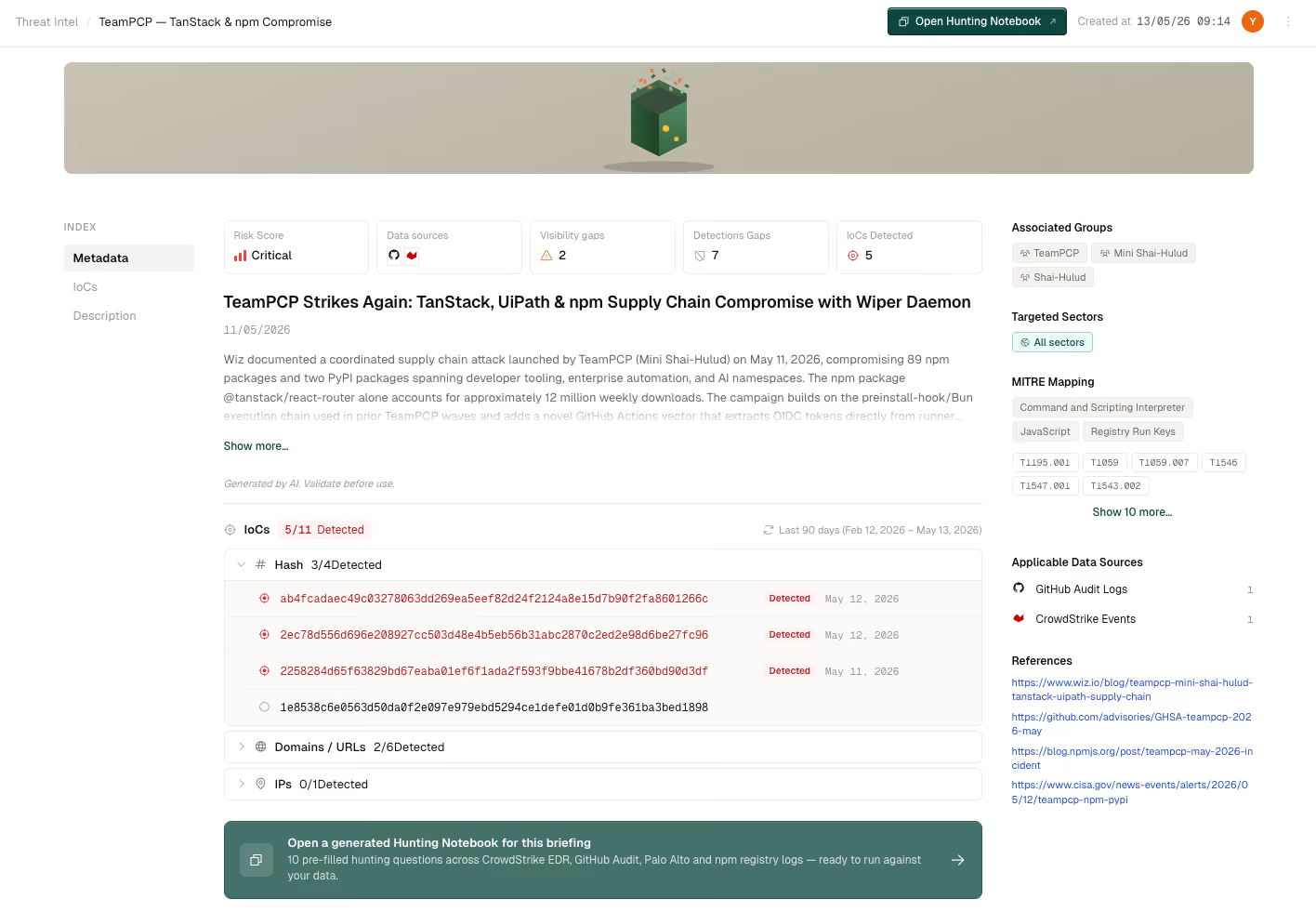
Open today's briefing on a fresh APT campaign and the answer is already there: summary at the top, IOC table below it. Next to a domain in that table is a hit count of three, with the most recent observation from eleven days ago. If that indicator showed up in a past investigation, it surfaces here too. You didn't run the search. You didn't pick the data sources.
You start where the evidence already points. Read the behavior section to see what follows the C2 callback, then pivot to the relevant query against EDR and proxy logs. If the campaign maps to a technique or procedure you don't yet detect, flip on the matching library detection or generate one from the behavior write-up. A conscious choice, not one deferred because the hunt ate the morning. That detection sticks. Next time the campaign or its variant shows up, the alert fires before anyone has to open another briefing.
From Hit to Investigation, Instantly
You see the hit. You want more.
Hunters used to start building a notebook, piece by piece. Pull the indicator into a cell, build the query against the right data source. Then the next query. Then the next. By the time the cells are runnable, the thread has cooled and you're rebuilding momentum.
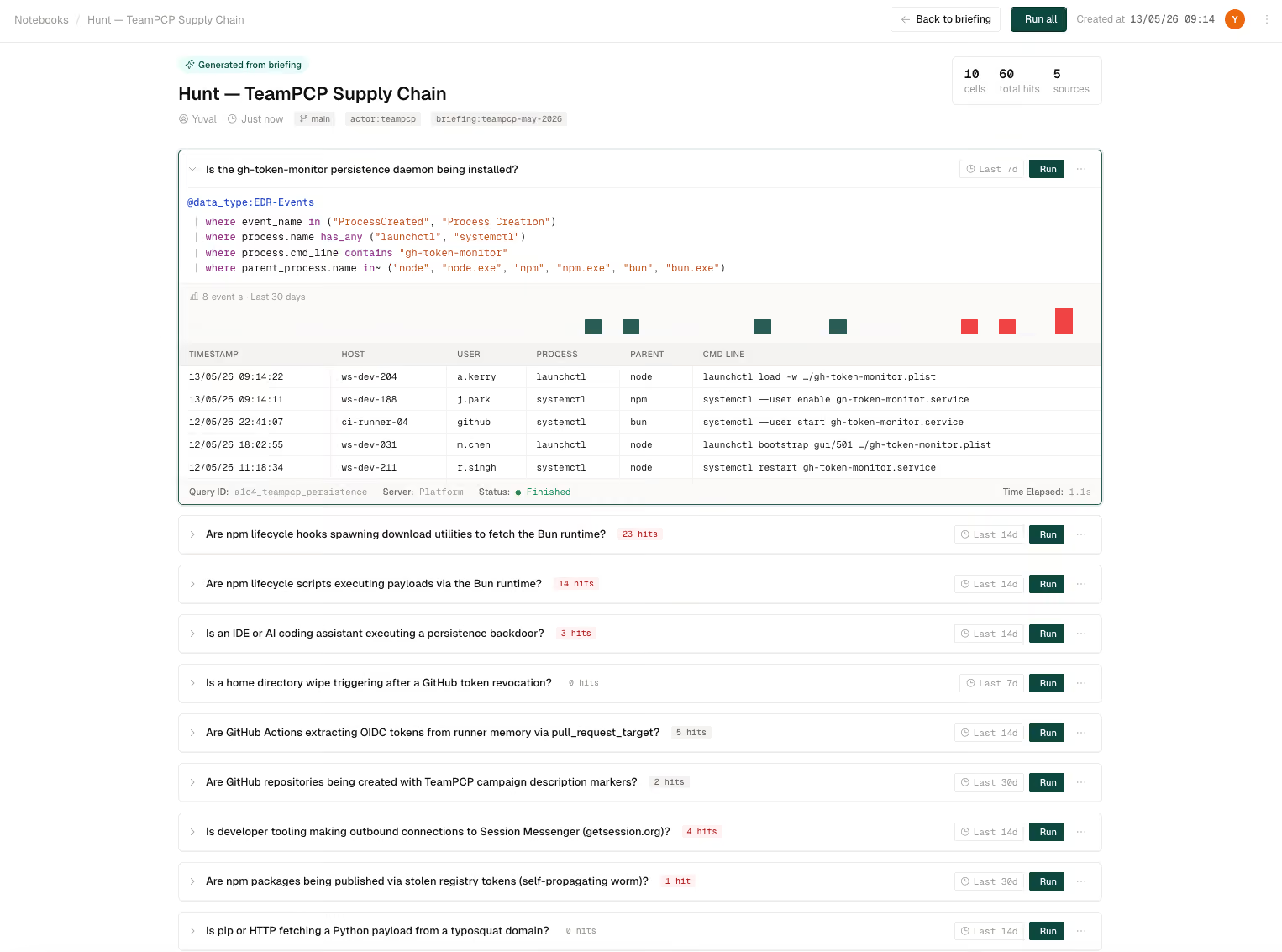
Click into the briefing's notebook and the work is already done. IOC search queries in the top cells, one per indicator type. Below them, behavior queries built from the campaign's techniques, populated as Vega finishes generating each one. Every cell is ready to run.
You pivot at the speed of reading. Hit an IOC row, jump to its cell, scope the result, ask the next question. If the behavior write-up flags credential dumping, the corresponding query is two cells down, waiting. You didn't write any of it.
When the hunt outgrows what's prepared, add the notebook to your library. The clone is yours to edit, extend, save. The original on the briefing keeps refreshing as new queries come online, so the next analyst landing on this briefing tomorrow gets up to speed without rebuilding any of it.
You're done once the story is clear and the impact is known. If indicators hit, the ready notebook carried the pivot from IOC to deeper hunt with no query-building required. Detections are live for the relevant techniques. When leadership asks "are we impacted," the answer is one sentence. No slides, no prep. No new pipeline to stand up, no ticket to file.
Key takeaways
- IOC extraction is automatic. Every briefing arrives with indicators parsed, typed, and ready to query.
- The hunt runs without you. The backsearch fires on arrival, so compromise evidence is in view when you open the briefing.
- Past investigations stay in scope. An indicator that showed up in earlier investigation work surfaces alongside fresh telemetry hits.
- Briefings close with coverage. Library and generated detections sit alongside the hunt, turning a relevant briefing into permanent coverage in the same session.
What's next
IOC Auto-Hunt is available now. Book a demo to see it run a live briefing through your telemetry. If you're working the broader coverage problem, MITRE ATT&CK coverage gaps you can see, prioritize, and close is a companion read.
.png)
.png)
.png)